
Git sync
A team that keeps its skills in a GitHub repo can connect the repo to Skael. Git stays the source of truth. A merge to the connected branch publishes a new version of each skill folder that changed, through the same scan and gate as any other publish.
Each skill is either git-bound or native. A native skill works as it always has. One instance can hold both, and you change one skill at a time.
Connect GitHub
Section titled “Connect GitHub”Skael acts as one GitHub App per instance. You create it from the UI, and you need two server settings first:
- A master key encrypts the App’s private key in Postgres. The server generates one on first start unless
SKAEL_MASTER_KEYSis set. Back it up with Postgres; see Backup & restore. - The public URL, on Settings → General, is where GitHub sends its redirect and its webhooks.
Then:
- Open GitHub App in the sidebar. Only an owner or an admin sees it.
- Enter the App name. Enter the organization that owns the App, or leave it empty to own the App yourself. For GitHub Enterprise Server, enter its URL.
- Click Connect GitHub. GitHub asks you to confirm and returns to Skael.
- Click Install on an organization. An organization owner approves the install and chooses the repos.
Any organization can install the same App. It is not listed on the GitHub Marketplace.
Create a connection
Section titled “Create a connection”A connection is one repo, one branch, one root path and one name prefix, such as platform:*. Every folder under the root path that holds a SKILL.md becomes a git-bound skill. Its name comes from the name in its frontmatter.
Only an admin, or a person who may change the ownership rule for the prefix, can create a connection. Open Git sync, click New connection, fill in the form, and click Preview. Nothing changes until you create the connection. The preview sorts every folder into one of four groups:
| Group | Means | Default |
|---|---|---|
| Adopt | A skill imported earlier from this repo and path. It keeps its versions. | Selected |
| Same name, other origin | A skill with this name exists, but it did not come from here. Compare the descriptions and the diff. | Not selected |
| Create | A name the registry does not have. | Created as version 1 |
| Refuse | Outside the prefix, declared by two folders, or already in another connection. | Refused, with the reason |
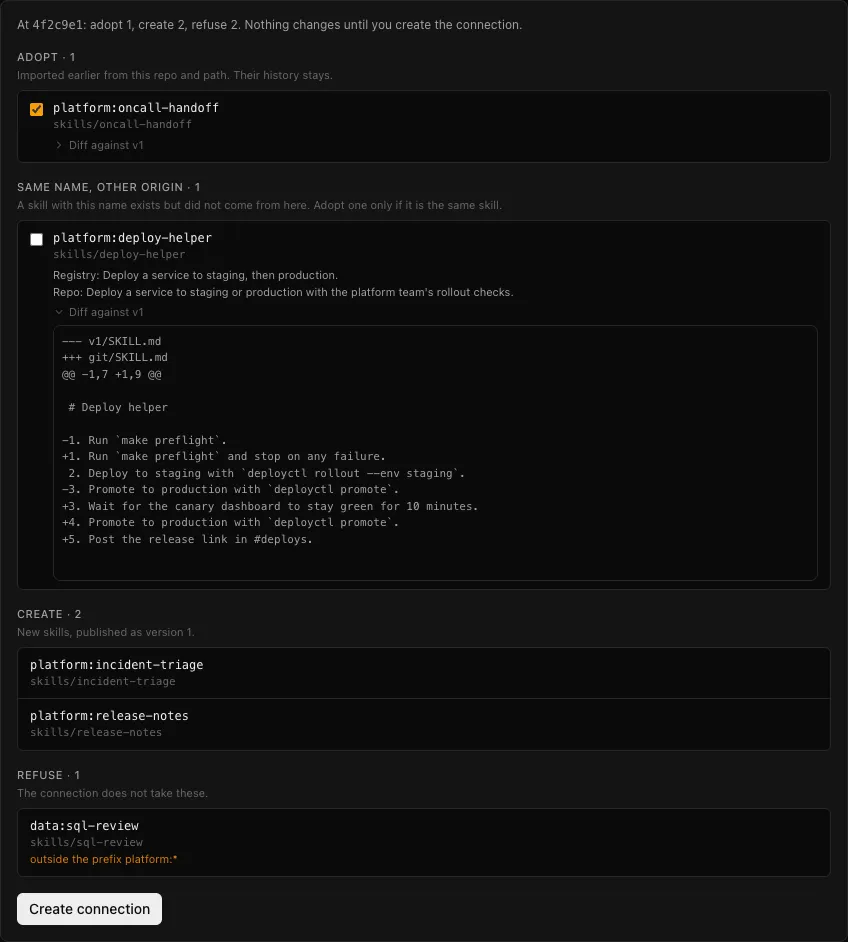
In this example, platform:deploy-helper exists in Skael but did not come from this repo. The diff shows that the repo’s version changes one step and adds two. The summary line counts it as refused until you select it.
An unselected skill in the second group is refused as “name taken”. You can adopt it later from the connection page.
Who publishes
Section titled “Who publishes”Each connection publishes as its own service account. The service account joins the ownership rule for the prefix, so a version from git gets no ownership hold. If no rule covered the prefix, the person who creates the connection becomes its owner, beside the service account. A narrower rule inside the prefix that another person owns still applies: a version under that rule waits for its owner.
The scan applies to every version from git. A version that the scan holds waits for review as usual. The audit log names the service account, the commit and the commit’s GitHub author.
How changes arrive
Section titled “How changes arrive”Skael checks each connection’s branch every minute. A push webhook from GitHub only brings that check forward. Skael works without webhooks, for example on a private network, and a change then takes up to a minute. The connection page shows whether webhooks arrive.
A push creates one version for each skill folder that changed. An unchanged folder creates no version. The first sync reads the branch head only, not the git history.
Changes in the repo
Section titled “Changes in the repo”- A folder is deleted. The skill keeps serving its last version and shows “removed from git”. A set that names it resolves with a warning. If the folder comes back, the mark clears. To remove the skill, delete it.
- A folder’s
namechanges at the same path. Skael renames the skill and keeps the old name as an alias. Consumers, sets on latest and sets pinned to an exact version all follow the rename, because the version numbers do not change. If the new name is taken or outside the prefix, the folder is refused, and the old skill is marked removed. - A folder moves and keeps its name. It is the same skill, at a new path.
Change a git-bound skill from Skael
Section titled “Change a git-bound skill from Skael”You do not need git or GitHub access to change a git-bound skill. A publish to a git-bound skill opens a pull request instead of creating a version. That applies to skael publish, an upload in the UI and an approved submission.
- The App commits the archive as the whole folder on a branch named
skael/<skill>/<id>. A file the archive does not have is removed from the folder. The commit has aCo-authored-bytrailer with your name, and the pull request names you. skael publishprints the pull request link. The API answers202with achangeobject instead of a version.- The skill page lists the skill’s pull requests and their state.
- Someone with access to the repo reviews and merges the pull request. The merge publishes the next version through the normal sync.
- An approved submission stays pending while its pull request is open. A merge approves it with the new version. A pull request that closes without a merge rejects it with the reason “PR closed unmerged”.
- A publish that the scan would block is refused before any pull request opens.
A merge or an import onto a git-bound skill is refused with 409, because git has no matching operation.
Checks on pull requests
Section titled “Checks on pull requests”Skael posts a check named Skael on every open pull request into the connected branch that changes a skill folder. It scans each changed folder at the pull request head and gives one result:
| Conclusion | Means |
|---|---|
failure | The scan blocks a folder. The merge would publish nothing for it. |
neutral | A folder would be held for review when it merges, or the merge would not publish it. The check lists the reasons. |
success | Every changed folder passes the scan. |
On a pull request that Skael opened for a change, the check also reports when the requester does not own the skill. Whether the check is required is your choice in GitHub’s branch protection.
Contests on pull requests
Section titled “Contests on pull requests”A contest runs the pull request head against the released version, on the skill’s latest suite. It takes a while and costs model calls, so each connection chooses when one runs:
- Off. The check scans only.
- On request. This is the default. Any of these starts a contest: the
skael:contestlabel, the Run contest button on the check, or Run contest on the connection page in Skael. - Every pull request marked ready for review. A pull request from a fork still needs a request, so a stranger cannot spend your model budget.
The check reports the running contest and then its verdict, with a link to the contest. A verdict never changes the check’s conclusion, because a contest holds nothing. When the merged folder is exactly the evaluated pull request head, the new version links that contest. The version still gets its normal evaluation, because a contest has no baseline and no headline score.
Skael deletes a stored pull request head when its pull request closes, unless a contest references it.
Detach a skill
Section titled “Detach a skill”Detach on a skill page makes the skill native. It keeps every version, and its connection never adopts it again. Deleting a connection makes all its skills native and deletes its service account.
When a connection fails
Section titled “When a connection fails”If the App loses access to the repo, or the branch is deleted, the connection shows an error with the reason. No skill changes until you fix the cause.